

Translated from English by gtranslate.io
This is an old revision of the document!
The main screen of the app displays the map, your current location and basic controls:


 . If you prefer single-hand control, double-tap and drag the map to zoom it. Otherwise, use the zooming buttons.

You can also rotate the map manually with two fingers.
The main menu button slides up a panel with the Locus account login, an offer of the basic features, app settings and the Premium subscription menu.
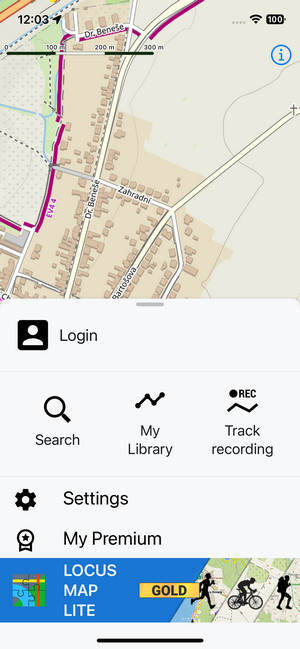
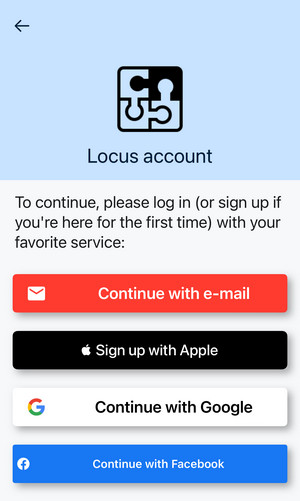
Tapping the login button displays a selection of services for login/signup to a Locus account: an e-mail, Apple, Google and Facebook:
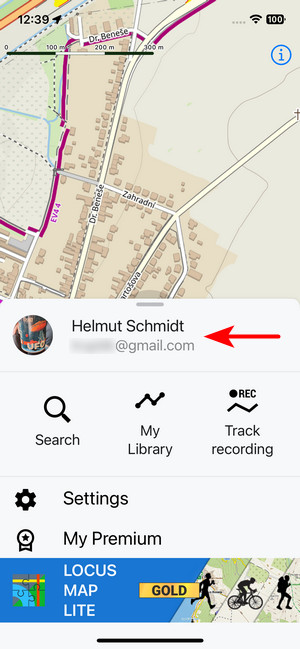
 When you are logged in, your user name and email address are displayed on the header:
Opens a screen with various configurable parameters of the app >>
Here you can select your Premium plan. The options become available after logging in with your user account. After subscribing to Premium, the section is renamed to My Premium and becomes a place where you can review your subscription and cancel it.
This option opens a selection of maps that you can download for offline use. More info >>
The section contains a few useful links:
Plus, information about the app's version - very useful when you communicate with Locus Map's support - and the latest news in the app.


