

Translated from English by gtranslate.io
Increasingly, users have reported issues with losing their GPS signal during track recording when their device enters standby, resulting in direct lines instead of accurately recorded tracks. What to do to avoid it?
The operating system must be set for Locus Map NOT to switch GPS off in standby mode (when the display goes off) - always select the All the time permission for Locus Map.
The “all the time” permission is not included in the system app permissions. You can select only “while using this app” or “ask every time”:
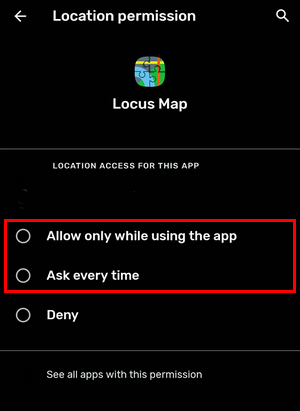
When you launch Locus Map and start a feature that runs in the background (voice navigation, track recording, live tracking…), Locus Map displays a compulsory warning:
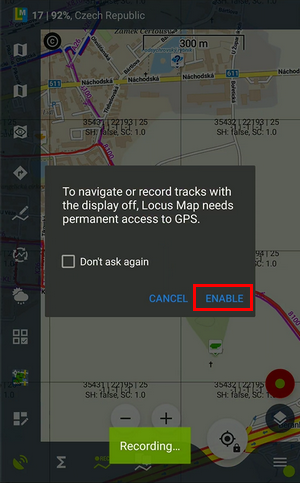 . Then you are prompted to allow all-time access to the location in the system settings:
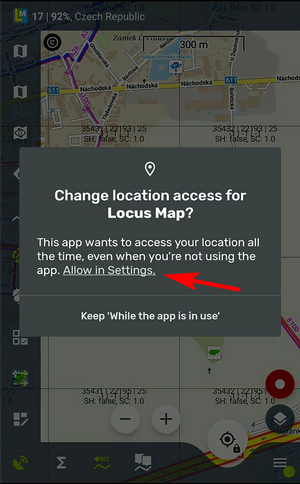
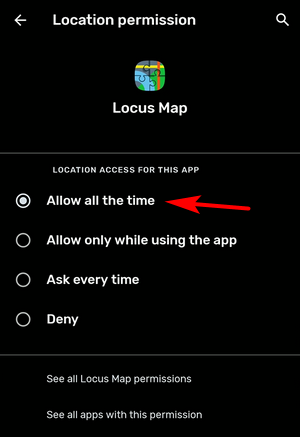
This setting, however, is not permanent. After not using the app for some time (e.g., three months), the “all-time” access permission is taken away and you have to go through this procedure again.
This OS version divides permission to access GPS location into three modes:
Battery saving modes or other performance-optimizing settings on your device kill apps they consider unused or redundant, no matter whether the app is running in the background on the user's request. The mode can be named differently depending on the device manufacturer. There are two ways to prevent this: either switch the saving mode completely OFF or make an exclusion for Locus Map if possible. For example:

For device-specific instructions, please visit Dontkillmyapp.com »
On some devices, this option causes the GPS for Locus Map running in the background to be killed. So, if you experience such behavior despite having performed the actions in steps 1 and 2, please do the following:


